PackSeats
A personal tool that pings my phone the second a seat opens in a full NC State class, instead of refreshing the course catalog all week during registration. Comes with a conflict-aware schedule planner and an opt-in shared bot so friends can use it too.
Jul 2026 – Present · Running
The idea came out of pure frustration. As a junior I was stuck trying to get into a 100-level health and fitness class that was completely full, camped on the course catalog hitting refresh and getting nowhere. So I threw together a rough prototype to watch the section for me, and within a couple of hours it caught an open seat and I was in.
That got me curious, and once I started paying attention I realized just how often students drop classes. Seats open up constantly throughout registration; you just have to be looking at the exact second one does. What makes it worse is that some classes have a waitlist, so you can add yourself and wait your turn, but plenty of others, the health and fitness ones included, have no waitlist at all. Those are exactly where this helps: the only way in is to catch the moment a seat frees up before someone else refreshes into it first.
So I built the prototype out into PackSeats. It polls the public NC State class search on a polite interval, notices the instant a watched section flips from full to open, and pushes a notification straight to my phone with a tap-through link to go grab the seat. No login, no MyPack, no SSO; public catalog only. It runs 24/7 on a free always-on VM, so it keeps watching with my laptop closed.
Features
- Watcher: checks each watched section every ~3 minutes (+ jitter) and notifies only on the transition from full to open, so a seat that sits open doesn’t spam every poll
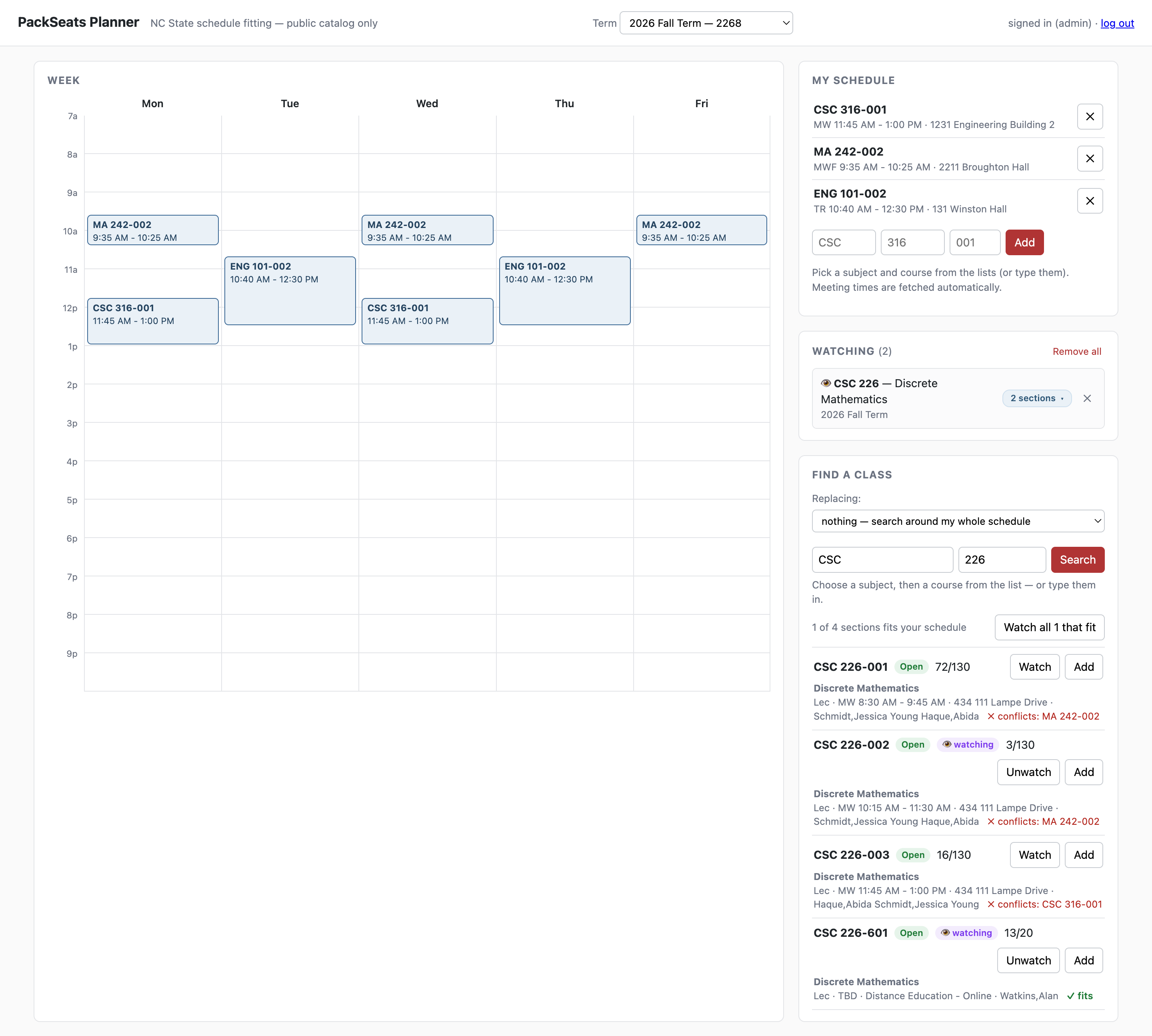
- Schedule planner: a single-page Flask UI that draws my week on a Mon–Fri grid and shows, for any course, which sections fit vs. conflict with my existing classes (conflicts are named), each with live seat status
- Replacing mode: hunt for a swap for one specific class I want out of
- Shared bot: an opt-in, invite-gated Telegram bot lets friends manage their own watches with no VM, no tokens, and no install; a seat alert fans out to everyone watching that section
How it works
Four entry points (CLI, planner, bot, watcher) share one fetch/parse core and integrate purely through a lock-guarded JSON file on disk, with no database and no server-to-server calls.
- One fetch/parse core: the CLI, planner, bot, and watcher all reuse the same seat/meeting-time parsing, reverse-engineered from the catalog’s JSON-wrapped HTML response
- Edge-triggered alerts: notify on the transition into open, not on every poll, by diffing against last-seen state on disk
- Politeness by design: conservative interval, random jitter, an identifying User-Agent, and one request per course per pass even when several of its sections are watched
- Safe concurrent writes: the UI and bot both write the same watch list, so every write goes through an atomic temp-file rename guarded by a file lock
- Passwordless web auth: friends log in through a short-lived signed-token link (no accounts, no passwords); every route is authenticated and scoped to the caller, and access is revocable on the next request
- Resilient loop: a single failed fetch logs and continues; one bad request never crashes the watcher
Tech
- Python 3: the watcher, planner, bot, and CLI
- requests + BeautifulSoup: fetching and parsing the catalog’s JSON-wrapped HTML
- Flask: the single-page schedule planner
- JSON files: all state (watches, last-seen seats, schedules); no database
- systemd + Oracle Cloud Always Free: 24/7 hosting at $0
- Caddy: reverse proxy for automatic HTTPS on the optional friends-facing planner
Status
Shipped and running. The watcher polls around the clock, notifications are live end-to-end, and the planner and shared bot are both in use. It reads only NC State’s public catalog and stores no credentials. It’s an unofficial personal tool with no affiliation to the university.